AI vectorizers promise a logo in five seconds. Here is what they do not tell you.
Upload a logo, click a button, get an SVG back instantly. AI vectorizer tools have exploded in the last year, and it sounds like hand-tracing should be dead. But what happens when that auto-traced file goes to a real printer, an embroidery machine, or a sign shop?
A recent file-by-file comparison by Pixeltrims put AI vectorization against manual tracing on production files. The algorithms came up short on sharp corners and exact brand colors. Their rule of thumb matches exactly what we tell our clients: AI for a fast first look, a human for anything a printer will touch.
Here is the full honest breakdown.
What Is Manual Vector Tracing?
Manual vector tracing is when a trained designer rebuilds your raster image node by node, by hand, in professional design software. Every anchor point and curve is placed deliberately. Nothing is guessed.
What Is AI Vectorization?
AI vectorization (auto-trace) uses an algorithm to detect edges and color regions in your image and convert them into vector paths automatically. No human involved. It is instant and often free, which is exactly why it is tempting.
Where AI Vectorization Falls Short
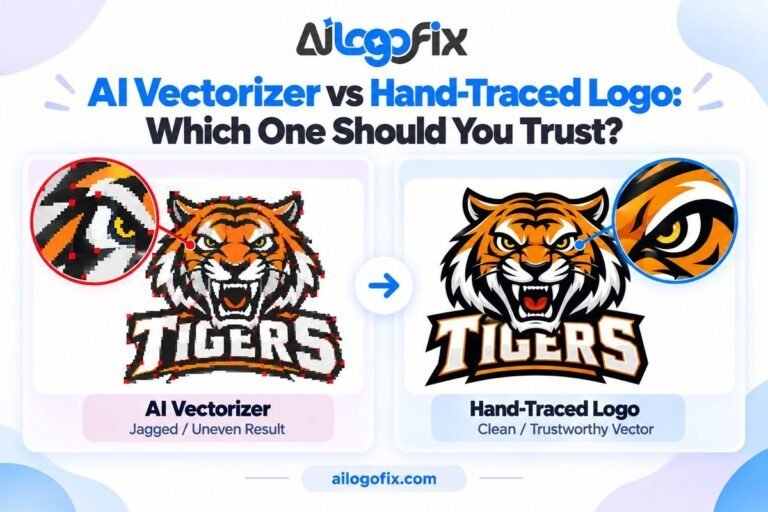
Sharp corners get rounded. Auto-trace smooths corners into curves and merges fine details that should stay separate. Painful on text-heavy logos.
Colors are approximated, not matched. AI tools guess at colors instead of matching your exact Pantone or brand hex value.
Gradients and complex artwork confuse it. Full-color illustrations and detailed artwork come out muddy.
Print and embroidery files need surgery first. Files for embroidery digitizing or large-format print need clean, separated shapes. AI output almost always needs a human editor to fix it before it is usable.
Bad source in, garbage out. A blurry scan gives the algorithm almost nothing to work with, so it guesses, and the guesses show.
Why Manual Vector Tracing Still Wins for Production Files
This is where hand tracing earns its keep:
- Exact node placement — sharp corners stay sharp, curves stay smooth, text stays readable at any size.
- True brand color matching — your exact Pantone, CMYK, or hex values, not approximations.
- Production-ready separations — clean, separated shapes ready for embroidery digitizing, screen printing, vinyl cutting, and large-format print.
- Works from rough sources — a blurry photo, a damaged scan, a tiny web graphic. A human designer can reconstruct what an algorithm can only guess at.
- One master file for everything — print, web, embroidery, signage. Done once, done right.
The Honest Trade-Off
AI vectorization is free (or close to it) and instant. Manual tracing costs more and takes a designer a few hours, because a real person is placing every node by hand.
Here is the math that matters: a rejected print run, a ruined batch of embroidered shirts, or a sign printed in the wrong brand color costs far more than the redraw ever would.
Which Should You Choose?
If the file is going to a printer, a sign shop, an embroidery digitizer, or anywhere your exact brand colors matter — go manual. If you just need a rough vector for an internal mockup, an AI vectorizer saves time. Most smart businesses use both: AI for the fast first look, manual tracing for the final production file.
Get a Production-Ready Vector File — Done by Human Specialists
Send us your logo in any condition — blurry, small, or damaged — and our specialist designers will hand-trace it into a clean, print-ready vector with exact brand colors. Ready for printers, embroidery, and sign shops.
Or message the AiLogoFix team and send us your logo for a quick review.