Manual vector conversion
Convert Your Logo to Vector — Hand-Redrawn in 24 Hours, from $10
Turn the logo you already have into scalable artwork. Send a JPG, PNG, screenshot, scan, or photo, and an AiLogoFix designer will redraw it by hand. You’ll get vector files that can be used at different sizes, with full commercial rights.
Convert My Logo to Vector- 100% manual redraw
- Full commercial rights
From pixels to vector
When your logo looks blurry or your printer rejects the file
A logo can look fine in an email signature and still fall apart when you enlarge it. A raster image is built from pixels. Stretch it for a sign or a larger print, and the same pixels have to cover more space. That can make lettering look fuzzy and turn smooth curves into visible steps.
If your printer asks for a vector file, changing the extension or saving a JPG inside a PDF leaves the original pixels in place. A vector logo is built from paths that can scale. A manual conversion replaces the pixel artwork with those paths so your printer has scalable artwork to work with.
Before choosing a format, ask where the logo will be used and what the recipient accepts. If your printer rejects the file, keep their specification with your reference so you know which delivered format to send back.
What you get with a hand redraw
AiLogoFix manually redraws your pixel logo or artwork. Your designer rebuilds the shapes and curves using your reference and the agreed brief, so the finished logo can scale without the jagged edges that appear when a raster image is enlarged.
- Scalable vector artwork. Keep a vector master you can resize for future uses.
- Four vector formats. AI, EPS, SVG, and PDF are included in every package. Standard and Premium also include JPG and PNG copies.
- Full commercial rights. Use the delivered artwork for your business.
- A chance to review the redraw. Ask for refinements within your selected package and agreed brief before you approve it.
How the conversion works
Send your file
Start with the clearest version you have. A JPG, PNG, screenshot, scan, or photo of the logo is enough to get started.
A designer redraws it
The designer uses your reference to rebuild the artwork as vector paths, paying attention to the shapes, curves, and details in the agreed brief.
Review and approve
Compare the redraw with your reference. Check the details that matter to you and share any refinements within your selected package and agreed brief.
Receive your files
After approval, receive the agreed formats. Keep the vector files together so you have a scalable copy ready the next time you need it.
Package prices and delivery times
Use this table to compare the three Raster to Vector packages before choosing one on the service page. Each package includes AI, EPS, SVG, and PDF. If you also need JPG and PNG copies, compare Standard and Premium.
| Package | Price | Delivery | Extra files |
|---|---|---|---|
| Basic | $10 | 24 hours | — |
| Standard | $25 | 48 hours | JPG, PNG |
| Premium | $50 | 72 hours | JPG, PNG |
Basic has the shortest listed delivery time. Compare the turnaround with when you need the logo and check which formats your printer or website accepts before choosing a package.
Convert My Logo to VectorFile formats you’ll receive
- AI
- EPS
- SVG
- JPG
- PNG
AI, EPS, SVG, and PDF are the vector deliverables. If someone requests a specific format, send the corresponding file instead of a screenshot of the logo. SVG is useful when a website needs scalable artwork. For print, send the format your printer asks for.
JPG and PNG are pixel-based copies included with Standard and Premium. They’re useful when an upload requires a raster image. Keep the vector files as your masters for resizing.
Why auto-traced logos can cause print problems
Auto-trace follows the pixels it detects, including blur and compression artifacts. That can leave rough edges or create thousands of nodes where a few controlled curves would describe the shape more clearly. Zooming in on an automatic trace can reveal bumps and tiny fragments that were hard to see at the original size.
Auto-trace also cannot determine which shapes should be kept separate for a particular print process. It can leave pieces merged or scattered rather than provide the color separations a printer may ask for. A designer can use the reference and brief to decide which edges and shapes belong in the redraw.
Before and after a manual redraw
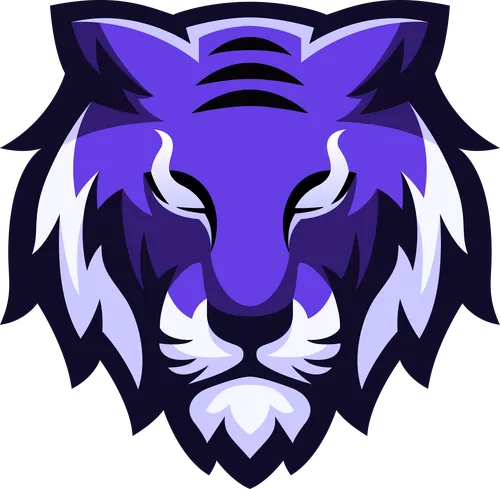
In the comparison above, look at the outline and small gaps in the tiger logo. The source is visibly soft, especially where dark and light areas meet. The hand-redrawn version makes those boundaries easier to distinguish. Compare the two at the same size to see what changes along the edges.
Free auto-trace vs. a hand redraw
A free auto-trace can give you a quick way to see what software makes of an image. It can be difficult to judge the result until you enlarge it and inspect the curves and spaces between shapes. A hand redraw makes sense when the logo needs to look clear at different sizes and you want a designer to review the reference and rebuild the artwork.
Raster to Vector reviews
This is the aggregate rating for the existing AiLogoFix Raster to Vector service. Compare the sample redraw, available formats, and delivery times alongside the rating when deciding what you need.
Questions about converting a logo to vector
How much does it cost and how fast?
Basic costs $10 with 24-hour delivery. Standard costs $25 with 48-hour delivery. Premium costs $50 with 72-hour delivery. Basic is the fastest of the three packages.
What files do I get?
Every package includes AI, EPS, SVG, and PDF vector files. Standard and Premium also include JPG and PNG copies. Keep one of the vector files as your master so you have a scalable version to return to whenever you need a new size.
Is it manually traced or auto-traced?
A designer manually redraws the logo or artwork. The process is 100% manual and never auto-traced. You can review the result and request refinements within your selected package and agreed brief before approving it.
What do you need from me?
Send your current logo as a JPG, PNG, screenshot, scan, or photo. You can use the version you already have, even if it looks blurry. If a part is difficult to read, point it out when you send the file so it can be discussed in the brief.
Ready to turn your logo into vector artwork?
Keep your current file handy and continue to the Raster to Vector service to choose a package. Send the logo you have, then review the hand redraw before approving your final files.
Convert My Logo to Vector