
AI-generated logos can look impressive at first glance — but zoom in and the problems often appear fast: warped letters, uneven shapes, broken curves, random details, fuzzy edges, strange spacing, and colors that do not reproduce well in print. That’s where a professional fix for AI-generated logo flaws comes in.
In This Guide
- Why AI-Generated Logos Often Need Professional Fixing
- 7 Common Flaws We Fix in AI-Generated Logos
- Real Before & After: AI Logo Flaws Fixed by AiLogoFix
- How We Fix an AI Logo
- More Examples of AI-Generated Logo Flaws
- Why Manual Vector Redrawing Matters
- Should You Regenerate the Logo or Fix the One You Already Like?
- What to Send Us
- Quick FAQ
- FAQs About AI-Generated Logo Flaws
- 5 Mistakes to Avoid When Fixing AI-Generated Logo Flaws
- Pro Tips for AI Logo Owners
- When to Hire a Designer for AI-Generated Logo Flaws
- AI-Generated Logo Flaws Quality Checklist
- What Changes When Fixing AI-Generated Logo Flaws
- AI Logo Glossary
- Rush Repair of AI-Generated Logo Flaws: What to Expect
The good news is that you usually do not need to throw away the concept you like. A skilled designer can keep the original idea and rebuild the weak parts into a clean, professional logo that actually works for websites, packaging, signs, apparel, print, and social media.
Why AI-Generated Logos Often Need Professional Fixing
AI image generators are excellent for exploring ideas quickly. You can describe a style, mood, symbol, or industry and get multiple visual concepts in minutes. But an AI-generated image is still primarily an image. It is not automatically a production-ready brand asset.
Professional logos need precision. Typography must be readable. Curves need to be intentional. Shapes should be balanced. Stroke widths need consistency. Small details must survive at favicon size. Colors should work on screen and in print. And the final artwork should be available in clean vector formats such as AI, EPS, SVG, and PDF.
7 Common Flaws We Fix in AI-Generated Logos
1. Broken or Misspelled Typography
This is one of the most common problems. AI can produce letters that look almost right but contain fake characters, uneven spacing, awkward kerning, or misspelled words. We rebuild the typography so the brand name is accurate, readable, and visually balanced.
2. Jagged, Blurry, or Soft Edges
Generated logos are often delivered as JPG or PNG files. When enlarged for signs, packaging, uniforms, or printing, the edges can become blurry or pixelated. We manually redraw the artwork into clean vector paths so it can scale without losing sharpness.
3. Uneven Shapes and Bad Symmetry
Circles may not be truly circular. Badges can lean. Icons that should be symmetrical may have mismatched sides. These small problems are easy to miss at first, but they make a logo feel less professional. We correct the geometry while keeping the original concept intact.
4. Inconsistent Line Weights
AI often makes one part of an outline thick and another part unusually thin. This becomes especially obvious when the logo is printed small. We rebuild the stroke system so the design feels consistent from one element to the next.
5. Random AI Artifacts
Tiny dots, extra curves, unnecessary shadows, accidental marks, broken negative spaces, and strange decorative fragments are common. We remove the visual noise and keep only the details that actually help the identity.
6. Too Much Detail for a Real Logo
A logo can look beautiful at 2000 pixels wide but fail completely at 40 pixels. If the AI concept contains too many micro-details, we simplify them carefully so the logo remains recognizable on profile pictures, labels, embroidery, stamps, and small print.
7. Colors That Do Not Translate Well to Print
Bright RGB colors can change when prepared for CMYK printing. We can refine the palette and prepare practical color versions so the logo works across digital and print applications.
Real Before & After: AI Logo Flaws Fixed by AiLogoFix
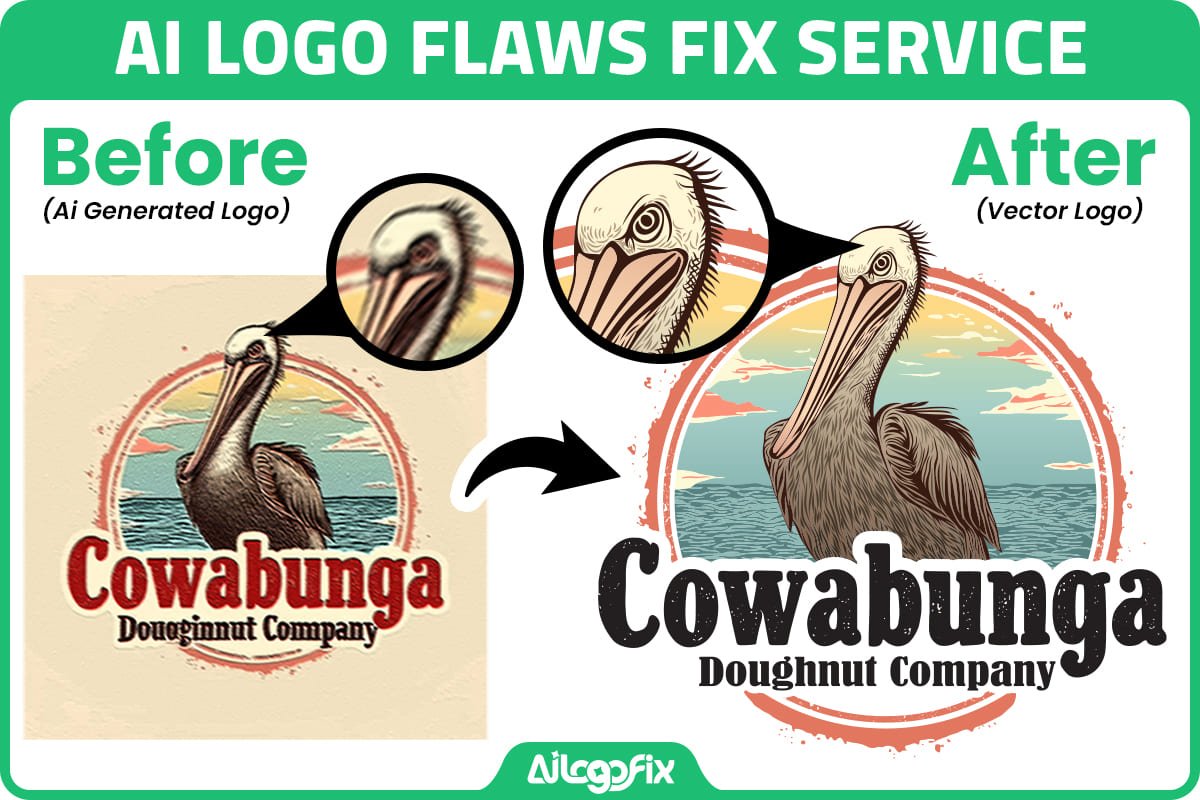
Below is a real example from our AI Logo Fix service. The original AI-generated artwork had the right idea, but the design needed cleanup before it could work as a professional logo. We corrected the lettering, refined the illustration, cleaned the contours, and rebuilt the artwork for better consistency.
How We Fix an AI Logo
Our AI generated logo fix process is simple: Audit → Redraw → Refine → Deliver.
First, we inspect the logo. We look for typography errors, broken shapes, bad spacing, inconsistent lines, unwanted artifacts, color problems, and anything that may fail during printing or scaling.
Next, we manually redraw the important parts. We do not rely on a one-click auto-trace for critical logo geometry. The goal is to create cleaner, more intentional paths and preserve the visual character you liked in the AI concept.
Then, we refine the details. Typography, spacing, curves, symmetry, stroke weight, color, and small-size readability are corrected.
Finally, we prepare professional files. Depending on the project, you can receive editable AI, EPS, SVG, PDF, transparent PNG, and high-resolution JPG files ready for real-world use.
More Examples of AI-Generated Logo Flaws


Why Manual Vector Redrawing Matters
A vector file is built from editable paths and shapes rather than a fixed grid of pixels. That means it can be resized from a tiny social-media icon to a large storefront sign without becoming blurry.
But simply converting a PNG into an SVG does not automatically make the design professional. A messy trace can still contain hundreds of unnecessary points, lumpy curves, awkward corners, and bad typography. That is why our AI-Generated Logo Fix Service focuses on manual correction and redraw — not just file conversion.
If your main problem is that the logo is blurry or low-resolution rather than AI-generated, our Raster to Vector Service is also designed for that.
Should You Regenerate the Logo or Fix the One You Already Like?
If the concept itself is wrong, regenerating can make sense. But if you already love the symbol, composition, or overall style, starting over can waste time and create a different set of problems.
In that situation, professional cleanup is usually the better option: keep the concept, fix the flaws, and turn it into a usable brand asset.
What to Send Us
You do not need a perfect source file. Send the best version you have — JPG, PNG, screenshot, AI-generated image, or even a low-resolution copy. If there are specific flaws you want corrected, mention them. If not, our AI logo fix team can inspect the logo and point out what should be improved.
Keep the concept. Fix the flaws.
If your AI-generated logo looks almost right but still feels unfinished, our AI generated logo fix service can manually refine it, fix the weak areas, and recreate it as clean, scalable vector artwork.
Or message the AiLogoFix team and send us your logo for a quick review.
Quick FAQ
Can you fix a logo made with ChatGPT, Midjourney, Gemini, DALL·E, or another AI tool?
Yes. If you can provide the generated image, we can inspect the design and determine what needs to be redrawn, corrected, or simplified.
Will you change the design completely?
Not unless you ask us to. The main goal of an AI logo fix is usually to preserve the concept you already like while improving the parts that look incorrect or unprofessional.
Can you make the final logo a real vector?
Yes. For suitable logo artwork, we can recreate it as clean vector artwork and provide editable professional formats.
Can you fix only the text?
Yes. We can correct typography, spelling, spacing, alignment, font styling, and other text issues without redesigning the entire logo.
What if my AI logo is very detailed or realistic?
Highly realistic images, complex 3D effects, photo-like textures, and heavy Photoshop-style effects may need simplification rather than a literal vector recreation. We will tell you the best approach before starting.
FAQs About AI-Generated Logo Flaws
Answers to the questions clients ask us most about AI logo fix work.
Can any AI-generated logo be fixed?
Almost always, yes. Professional AI logo fix service rebuilds the design as clean vector artwork, correcting whatever the generator got wrong: garbled text, warped shapes, extra limbs on mascots, impossible geometry. The only cases where AI logo fix cannot help are trademark conflicts, where the AI copied an existing brand too closely. In that situation you need a fresh design, not a repair.
How is fixing AI-generated logo flaws different from auto-tracing the image?
Auto-trace copies flaws; AI logo fix corrects them. Running an AI logo through Illustrator’s Image Trace preserves every mangled letter and wobbly curve, just in vector form. Real AI logo fix means a designer studies the concept, redraws it properly by hand, fixes the text, balances the composition, and then builds clean vector paths. The difference is visible instantly.
What does fixing AI-generated logo flaws cost?
AI logo fix typically costs less than a full logo design, because the concept already exists. Pricing depends on complexity: simple text corrections are quick, while rebuilding a detailed mascot takes longer. Most AI logo fix projects fall in the same range as standard vectorization work. Ask for a quote with your image attached and you will get an exact price, not a guess.
Will the fixed logo still look like my AI concept?
Yes, that is the whole point of AI logo fix. The designer preserves your concept, colors, and style while repairing execution flaws. Think of it as the same logo, drawn by a professional instead of a probability engine. Clients are usually delighted: the AI logo fix result looks like what they imagined the AI had made, before they zoomed in and saw the problems.
How long does fixing AI-generated logo flaws take?
Most AI logo fix orders complete in 24 to 48 hours. Simple text and shape corrections can be same-day; complex illustrations need more time. If you have a launch deadline, mention it upfront. AI logo fix is one of our most rushed services, because clients usually discover the flaws days before they need the files.
What files do I receive after AI-generated logo flaws are fixed?
A complete AI logo fix delivery includes AI, EPS, SVG, and PDF vector masters plus high-resolution PNG and JPG exports. Every file is built from the corrected artwork, so the flaws are gone in all formats. This is the key advantage of professional AI logo fix over quick online converters: you get production-ready files a printer can actually use.
5 Mistakes to Avoid When Fixing AI-Generated Logo Flaws
1. Auto-tracing and calling it fixed. Image Trace vectorizes the flaws along with the design. Genuine AI logo fix requires manual redrawing, not a one-click filter.
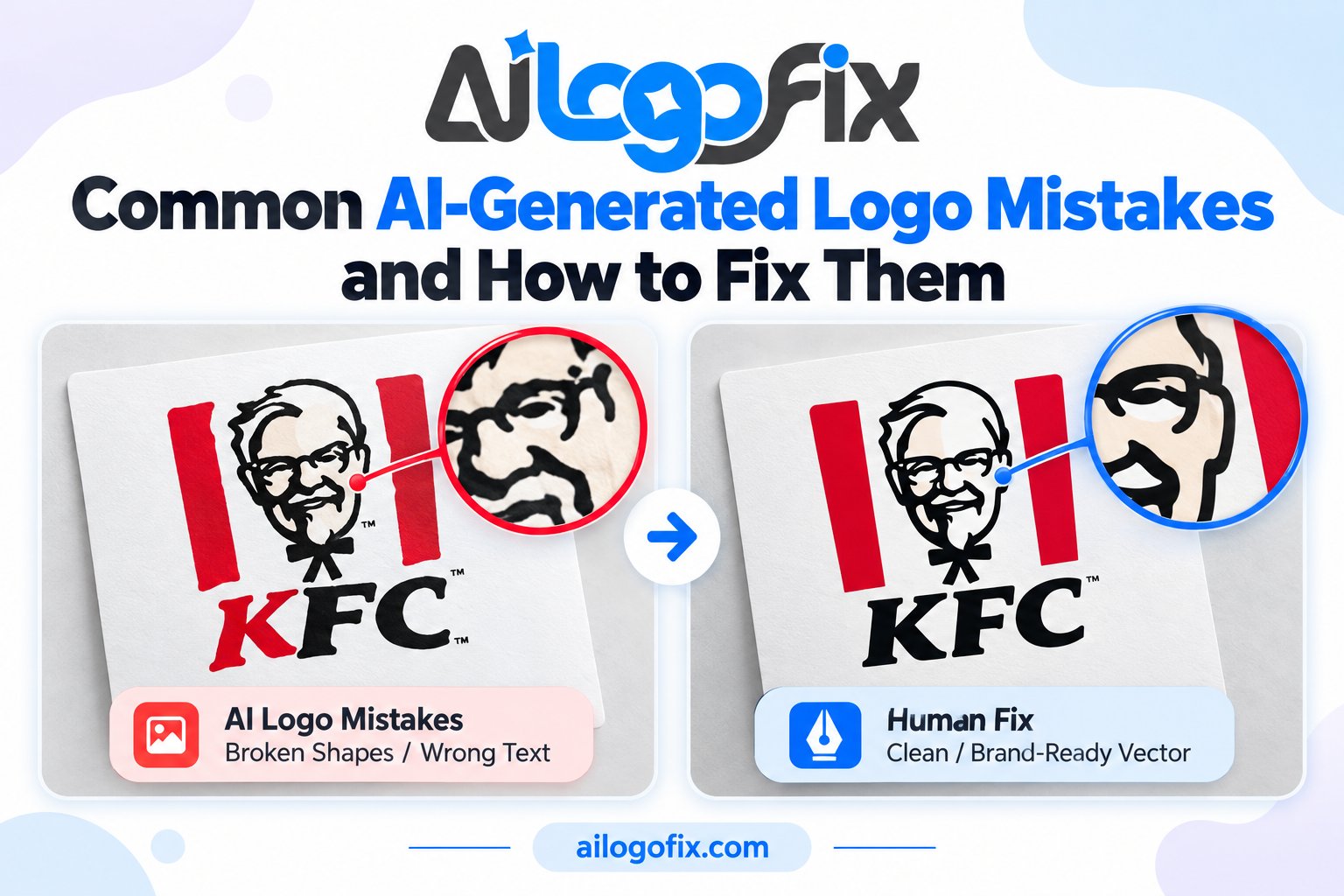
2. Fixing the text but ignoring the shapes. AI generators mangle geometry too: uneven curves, broken symmetry, floating elements. A complete AI logo fix audits every path, not just the lettering.
3. Keeping AI color banding. Gradients from AI tools often band or posterize in print. During AI logo fix, colors should be rebuilt as clean CMYK builds or smooth vector gradients.
4. Skipping the trademark check. AI models remix existing designs. Before investing in AI logo fix, do a quick image search to make sure your concept is not someone else’s logo.
5. Using the fixed logo at only one size. The point of AI logo fix is scalable vector masters. Test the result from favicon to billboard before approving.
Generative models are improving fast; read about generative artificial intelligence on Wikipedia for context.
Pro Tips for AI Logo Owners
Generate variations, then commit. Use the AI for ideation and pick one concept before ordering AI logo fix. Fixing three concepts costs three times as much; fixing one is efficient.
Upscale before sending. Give the designer the highest-resolution AI output available. Better source material makes AI logo fix faster and more faithful to your vision.
List the flaws you see. Tell the designer exactly what bothers you: the misspelled word, the extra finger, the crooked line. A clear punch list focuses the AI logo fix and avoids revision rounds.
When to Hire a Designer for AI-Generated Logo Flaws
Hire a designer as soon as your AI logo needs to appear anywhere professional: packaging, signage, a website header, an investor deck. AI output looks fine as a thumbnail and falls apart everywhere else, which is exactly what AI logo fix solves. This is urgent before any print run, because printers reject flawed files and reprints are expensive.
It is also essential if you plan to trademark the mark, since examiners reject applications with inconsistent or copied elements. Our team specializes in AI logo fix: we repair text, rebuild geometry, correct colors, and deliver full vector masters. Message our design team with your AI image for a free assessment and fixed quote. If the logo also needs format conversion, our raster to vector service is included in every fix.
AI-Generated Logo Flaws Quality Checklist
Use this checklist to judge any AI logo fix before you approve it.
- All text spelled correctly, with proper letterforms and kerning
- Shapes symmetrical where symmetry was intended
- No stray marks, extra limbs, or floating artifacts
- Colors rebuilt as clean CMYK or Pantone builds
- Vector paths smooth at 6400% zoom
- Logo works in single color (black and white)
- Readable at 16 pixels and sharp at billboard size
- Source files delivered: AI, EPS, SVG, PDF
- Web exports included: PNG with transparency, JPG
- Concept faithfully preserved from the original AI logo fix brief
Run through this list with your designer on a screen share. A proper AI logo fix passes every item. If anything fails, ask for a revision before final files are delivered. This ten-minute review protects you from discovering flaws after the AI logo fix has already been printed on five thousand boxes.
What Changes When Fixing AI-Generated Logo Flaws
Clients often ask what actually happens between the flawed AI image and the finished AI logo fix. First, the designer studies your concept and lists every defect: misspelled words, broken letterforms, asymmetric shapes, muddy colors, background junk. Then each element is redrawn by hand as vector paths, with text reset in proper fonts and spacing corrected optically.
Next comes color rebuilding. AI gradients are replaced with clean builds, and brand colors are matched to Pantone references where needed. Finally, the designer builds the logo system: primary lockup, simplified small-size version, monochrome variants, and clear-space rules. The finished AI logo fix is not just a cleaned image; it is a professional identity package ready for trademark filing, print production, and web use.
AI Logo Glossary
AI logo fix: Professional repair and vector rebuilding of AI-generated logo artwork.
Artifact: A visual glitch produced by the generator, such as warped text or extra shapes.
Vector rebuild: Manually redrawing artwork as resolution-independent paths.
Image trace: Automatic raster-to-vector conversion that copies flaws verbatim.
Lockup: The final arrangement of logo elements after AI logo fix is complete.
Rush Repair of AI-Generated Logo Flaws: What to Expect
Deadlines do not wait for perfect files. When you order a rush AI logo fix, the designer prioritizes the flaws that block production: text errors first, then geometry, then color. You will usually see a first proof within hours. Review it immediately and reply with consolidated feedback; every round trip costs time. Keep your phone nearby, because the fastest turnarounds happen when designer and client iterate live. Once approved, vector masters and web exports are delivered together, so you can send files to the printer the same day.