
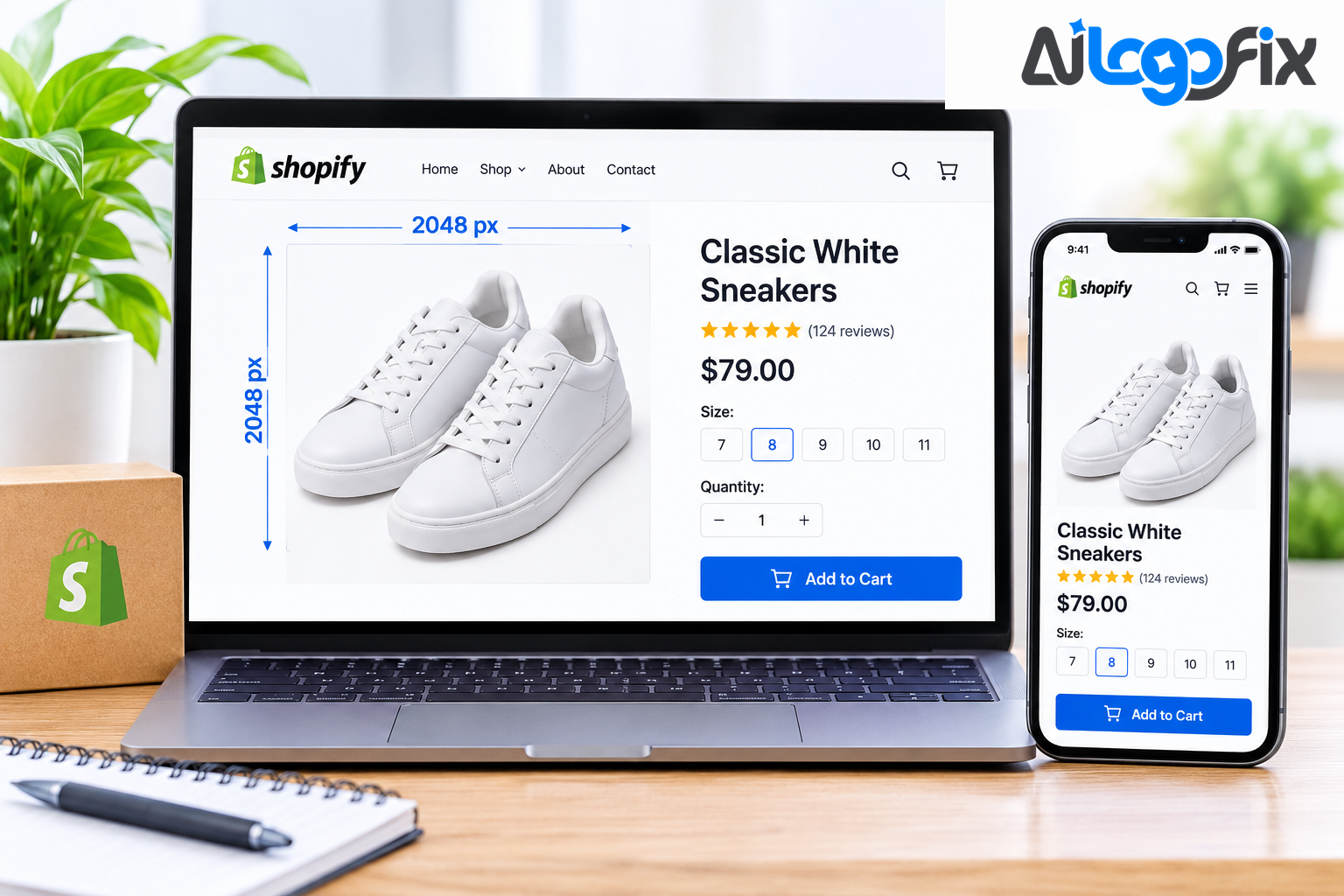
Open Shopify's own help pages and you will find three different numbers for product images: 2,048 pixels, 5,000 pixels, and 25 megapixels. Different guides add a fourth: 4,472 pixels and 20 megapixels. No wonder sellers are confused — Shopify's own documentation disagrees with itself.
The short answer is simple: upload your product images at 2,048 x 2,048 pixels, square, as a WebP or JPEG under 200–500 KB. Everything else on this page explains why that is the right number, what the other numbers mean, and where sellers go wrong.
What each number actually means
The confusion comes from three different numbers that answer three different questions.
2,048 x 2,048 px is the recommended size. Shopify's own recommendation for product photography is a 2,048 x 2,048 pixel square. It is the size that "usually displays best", and it is the size every current guide agrees on. It gives enough resolution for zoom and for retina displays, without pushing file sizes to where delivery becomes a performance problem.
5,000 x 5,000 px and 25 megapixels is the Help Center maximum. Shopify's Help Center page on product media allows images up to 5,000 x 5,000 pixels, or 25 megapixels, with files under 20 MB. That is a ceiling, not a target — it is the largest file Shopify will accept, not the size you should upload.
4,472 x 4,472 px and 20 megapixels is the developer maximum. Shopify's developer documentation says 20 megapixels, or 4,472 x 4,472 pixels at most. If you import products with a CSV file, the import refuses images over 20 megapixels. So the Help Center and the developer docs genuinely differ: 25 MP in one place, 20 MP in the other.
The safe choice is to stay under 20 megapixels, where no page can block you. A 2,048 x 2,048 pixel photo is just over 4 megapixels — comfortably inside every limit, with room to spare. Going bigger will not look any better on your store, because Shopify caps display at 2,048 pixels anyway. Uploading a 4,000-pixel PNG wastes storage and slows image variant generation with no visual benefit.
20 MB is the file size limit. Shopify accepts images up to 20 MB per file, but that only means Shopify can store a file that big. It does not mean a 20 MB product image is a good idea. If your files are over 1 MB, something is wrong with the format or the compression, not the dimensions.
Why 2,048 x 2,048 is the sweet spot
Three reasons, all practical.
Zoom. Most Shopify themes support image zoom on product pages, and the zoom view is the reason to upload at 2,048 pixels — shoppers who zoom in are high-intent buyers. Give them the detail they are looking for. Shopify lists 800 x 800 as the minimum for zoom; treat that as the floor, not the target.
Retina screens. Most Shopify themes use image containers between 600 and 1,200 pixels wide. A 2,048-pixel source gives sharp results at 2x display density, while a 1,000-pixel image stretched across a 1,200-pixel container looks soft — and soft product photos lose sales.
Shopify does the resizing for you. Upload at 2,048 pixels and Shopify automatically generates smaller responsive variants and serves the right one for each screen. But Shopify never enlarges an image beyond its original size — a 600-pixel photo stays at 600 pixels, and the browser stretches it on a big screen. Upload at 2,048 and you are covered; upload small and no setting can fix it later.
The minimums: how small is too small?
Guides agree on a floor, even if they phrase it differently. Never upload smaller than about 1,000 pixels, or zoom and large screens will show soft edges. Most guides put the practical minimum at 1,024 x 1,024 pixels — anything smaller looks blurry on retina displays or when customers use the zoom feature. One guide lists 800 x 800 as the minimum viable size for low-stakes products such as clearance items and accessories, and that is the right way to think about it: 800 is the floor for things you do not care about, 2,048 is the standard for everything else.
For portrait or landscape product photos, keep 2,048 pixels on the long side and let the short side match your chosen shape — for a 4:5 portrait, that is 2,048 x 2,560 pixels.
File size and format: the part that actually slows your store
Pixel dimensions get all the attention, but file weight is what slows a store down. A clean 2,048-pixel JPEG at quality 85 is typically 200–500 KB. Target under 200 KB per product image where you can, and under 500 KB as your ceiling. Under 100 KB is even better for page speed and Core Web Vitals.
Format matters more than most sellers realise. WebP is the best choice for product photos — Shopify already converts your images to WebP and AVIF automatically, serving WebP to modern browsers and falling back to your original format for older ones. Upload a WebP or a high-quality JPEG and let Shopify handle the conversion. Reserve PNG for images that genuinely need transparency, such as a logo or a cutout, because PNG files are much larger for photographs. A well-compressed WebP at 2,048 x 2,048 pixels should come in between 150–400 KB depending on image complexity.
Colour space is sRGB. CMYK is a printing format, and colours can shift when a screen displays it. Save your product images in sRGB, strip unnecessary metadata, and check them on a phone before you publish — most of your shoppers are on one.
Shape: square wins, consistency wins more
Shopify recommends square images because all Shopify themes are built to display product images at a 1:1 ratio. Always use square images for products. Mixed shapes — a square here, a tall portrait there — make the product grid look amateurish, because every theme crops to its own container and the crops will not agree.
If you want a portrait look, use 4:5 consistently across the whole catalogue (2,048 x 2,560 pixels). The rule is not really "square" — it is "one shape, everywhere".
Other surfaces, for reference: hero and slideshow banners around 2,000–2,400 pixels wide, collection banners around 1,600–2,000 pixels wide, and logos as an SVG or a 2x PNG. Your store logo should be a vector file, not a photograph — if yours only exists as a JPG or PNG, AiLogoFix's raster to vector service can redraw it as a clean SVG, and the logo design service can rebuild it from scratch.
Alt text and SEO: the free traffic most stores skip
Every product image should have descriptive alt text: what the product is, its colour, and its key feature. Alt text helps Google understand the image, helps visually impaired shoppers, and shows when an image fails to load. Name the file descriptively too — "blue-leather-wallet-front.jpg" instead of "IMG_4821.jpg" — file names are a small ranking signal and make your media library searchable.
Keep the main image free of promotional overlays. If your store feeds Google Shopping, Google's image rules ask for a clean main image, and a "50% OFF" badge baked into the photo can get the product disapproved. Put offers in the listing, not in the pixels.
Common mistakes
Uploading 5,000-pixel PNGs. You are inside the limit and outside good sense. Shopify caps display at 2,048 pixels, so the extra pixels only add weight and slow down variant generation.
Uploading tiny images. A 600-pixel photo cannot become sharp. Shopify never upscales, so the blur is permanent.
Mixed aspect ratios. Square on one product, portrait on the next, landscape on the third. The grid looks broken and the crops cut products in half.
CMYK files. Colours shift on screen, and some tools will not display them correctly at all. Always sRGB.
No alt text, no file names. IMG_4821.jpg with empty alt text is invisible to Google and useless to a screen reader.
Dirty backgrounds. A product photo with a grey, cluttered, or uneven background makes the whole store look cheap, and no pixel size fixes it. Clean cutouts on a consistent background are the cheapest store upgrade there is — AiLogoFix's background removal service puts product photos on a clean background by hand, so every listing looks like it came from the same studio. For more on listing-ready photos, see Background Removal for Amazon Product Images and JPG vs PNG vs SVG for Logos: Which File Should You Use?
FAQ
What is the best Shopify product image size?
2,048 x 2,048 pixels, square (1:1), as a WebP or JPEG under 200–500 KB, in sRGB. That is Shopify's own recommended display size, sharp on retina screens, and large enough for zoom.
What is the maximum image size Shopify allows?
Shopify's Help Center allows up to 5,000 x 5,000 pixels or 25 megapixels, and files under 20 MB. The developer documentation says 20 megapixels (4,472 x 4,472 pixels), and CSV import refuses images over 20 megapixels. Stay under 20 megapixels and you are safe on every page — and upload at 2,048 pixels anyway, because Shopify caps display there.
What is the minimum product image size for Shopify?
About 1,024 x 1,024 pixels is the practical minimum for sharp display and zoom. Shopify lists 800 x 800 as the minimum for zoom. Never go below about 1,000 pixels on the long side.
Should I upload PNG or JPEG to Shopify?
JPEG or WebP for product photos — WebP where possible, since Shopify serves it automatically. Use PNG only for images that need transparency, like a logo or a cutout, because PNG photographs are much larger files.
Do I need different sizes for mobile and desktop?
No. Upload one 2,048-pixel master and Shopify generates the responsive variants automatically, serving the right size for each screen. What you do need is one consistent shape across the catalogue, so the grid and the crops behave.
Conclusion
Shopify's three numbers are one recommendation plus two ceilings. The recommendation is 2,048 x 2,048 pixels. The ceilings are 5,000 x 5,000 pixels (25 MP) in the Help Center and 4,472 x 4,472 pixels (20 MP) in the developer docs. Upload at 2,048, keep files under 200–500 KB, stay in sRGB, use one shape, and write real alt text.