Your logo exists as a JPG on your website and a PNG someone sent you on WhatsApp. Your printer asks for a vector file, your sign shop needs an AI or EPS, and you enlarge the JPG for a banner and it turns into a blurry mess. This is the exact moment a vector tracing service earns its money.
A vector tracing service converts your pixel-based artwork — JPG, PNG, GIF, BMP, or a scanned sketch — into clean, scalable vector files usable at any size, from a business card to a billboard, without losing quality. This guide explains what it includes, what it costs, and how to pick a provider you will not regret.
What is vector tracing?
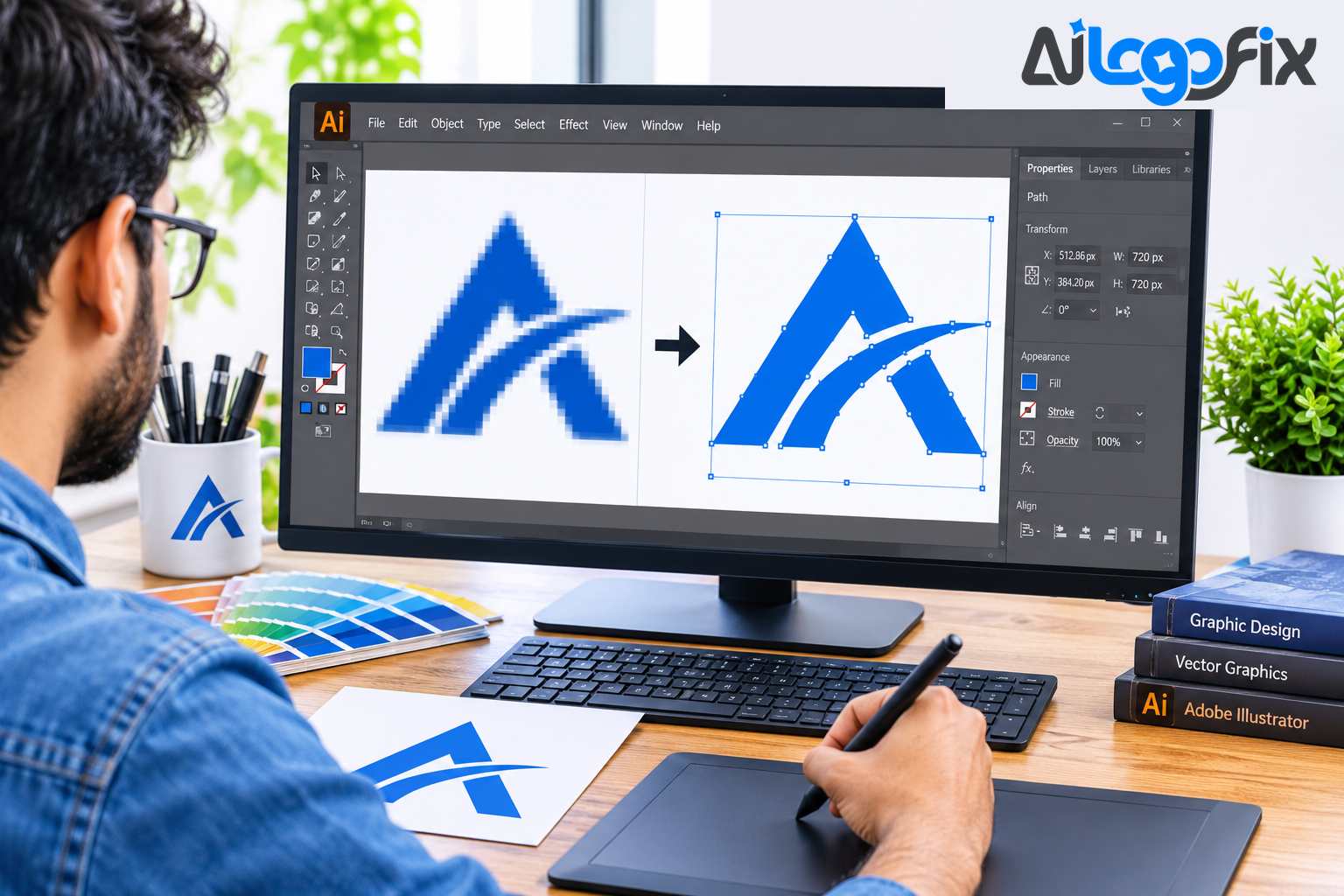
Raster images are made of pixels. Enlarge them and the pixels get bigger, which is why a logo looks blurry printed large. Vector files are made of paths, curves, and shapes defined by maths, so they stay sharp at any size. Vector tracing is the process of rebuilding a raster image as vector paths.
There are two ways to do it. Automatic tracing uses software to detect edges and generate paths. Manual tracing means a designer places anchor points and adjusts curves by hand, usually with the Pen tool in Adobe Illustrator, recreating the artwork shape by shape. The difference shows in the file: an auto-trace typically produces thousands of anchor points where a redraw uses tens, with rough edges and messy curves. A plotter, a printer, and an embroidery machine all follow those paths — so the quality of the paths is the quality of the result.
What a vector tracing service includes
A proper service is a small production process, not a single click. Here is what should be inside it.
1. Image assessment
The provider looks at your file first: how clear it is, how many colours it has, whether the text is readable, and whether the artwork is too unclear to reconstruct confidently. A good provider will say honestly when an original is too blurry to rebuild, not silently guess.
2. Manual redrawing
A designer redraws the artwork by hand in vector software, matching the shapes, curves, and proportions of the original. This is the core of the service — and what separates a professional result from an auto-trace. Logos, lettering, mascots, line art, and technical illustrations each need a different hand.
3. Colour matching
Colours are matched to the original, and a good provider will list them — Pantone, CMYK, RGB, or HEX values — so the logo prints the same everywhere. If your logo needs a one-colour version for vinyl cutting or engraving, that should be part of the delivery.
4. Path cleanup and smoothing
Edges are smoothed, curves aligned, and shapes made uniform. Overlapping paths are cleaned up, stray anchor points removed, and the file organised into editable layers so you or your designer can change colours and text later.
5. File formats you can actually use
The standard delivery is AI, EPS, SVG, and PDF — the formats printers, sign shops, and designers ask for. Higher tiers usually add JPG and PNG previews. If you need DXF for a laser cutter or colour separations for screen printing, ask before you order — those are production extras, not automatic inclusions.
6. Proof approval and revisions
You should see a proof before the final files are delivered, and be able to ask for adjustments. Ask whether the service includes manual cleanup, editable source files, multiple formats, proof approval, and revisions — those five things are the difference between a file you can use and a file you have to fix yourself. At AiLogoFix, revisions are refinements within your selected package and agreed brief.
Manual vs automatic tracing: why it matters
Every serious provider leads with this. An automatic trace follows every pixel of noise in your source image, including JPEG artefacts and blur. The result looks fine as a thumbnail and falls apart at print size: wobbly curves, thousands of unnecessary anchor points, and shapes a cutter or printer cannot follow cleanly.
A manual redraw rebuilds the artwork rather than tracing the pixels, so a small, compressed, or faded image is rarely an obstacle. The designer decides where a curve should be smooth, where a corner should be sharp, and which details matter. For logos, that judgement is the whole job — a logo is a brand asset, not a photograph, and it has to be exact.
What does a vector tracing service cost?
Pricing in this market is by complexity, not by file. Published ranges put independent illustrators at roughly $5 to $60 or more per image depending on skill and complexity, and agencies and specialised services at roughly $5 to $100 or more per image (Clipping Fly). The spread is wide because a simple one-colour logo and a detailed mascot are different jobs.
AiLogoFix's raster to vector service prices by package instead of by quote: Basic $10, Standard $25, and Premium $50, with delivery in 24, 48, and 72 hours. The price you see is the price you pay, and the package covers the redrawing, the standard formats, and refinements within your package and agreed brief. Read the tier, not the label — one service's "complex" is another's "standard", so compare what each package covers: colours, detail, text, and formats.
Turnaround matters as much as price. The market standard is around 24 hours for a standard logo, with rush options for deadlines. A provider quoting a week for a simple logo, or an hour for a detailed illustration, is a warning sign.
How to choose a provider: 6 checks
1. Check the portfolio and experience
Look for a portfolio showing work like yours — logos, lettering, mascots, or technical drawings. A provider that has only traced simple icons may struggle with your detailed artwork, and vice versa. Experience in your field translates directly into accuracy.
2. Ask whether the tracing is manual
This is the single most important question. Manual tracing in Illustrator, with hand-placed anchor points and cleaned-up paths, is what you want for anything printed, cut, or stitched. If the answer is vague, walk away.
3. Confirm the file formats
Make sure the service delivers the formats your printer or machine needs: AI, EPS, SVG, and PDF as a minimum, plus JPG or PNG previews. Ask about DXF for cutting and colour separations for screen printing if your job needs them — before you pay.
4. Confirm revisions and proof approval
Ask how revisions work and whether you approve a proof before final delivery. A remake guarantee — the file will be fixed if it does not print, cut, or stitch — is the strongest signal a provider stands behind its work.
5. Ask for a sample or test
Many illustrators will convert a free sample so you can judge quality first. One test image tells you more than ten promises on a sales page — if the sample comes back with clean curves and few anchor points, you have found your provider.
6. Give a clear brief
Provide the best-resolution file you have — a JPG, PNG, screenshot, scan, or even a phone photo of a sign is usually enough, since the designer rebuilds the artwork rather than tracing the pixels — say what the vector is for (print, embroidery, signage, vinyl), list the formats you need, and note any changes: a colour change, a text fix, a detail to drop. A clear brief prevents misunderstandings and unnecessary revisions. Our page on converting your logo to vector walks through exactly what to send.
Red flags to watch for
- The cheapest price with no portfolio. Low rates often mean automatic tracing with no cleanup.
- No mention of manual work. If the site never says "manual" or "hand-traced", the work is almost certainly automated.
- No proof or revision process. If you cannot see the result before delivery, you are buying blind.
- One format only. A service that delivers only SVG, or only PNG, is not a full vector service.
- No questions about your use case. A provider that never asks what the file is for cannot prepare it for your machine.
Related work: if your artwork started as a hand drawing, the sketch to vector service turns it into a professional logo file, and the image to outline service converts photos into clean line art. For the conversion itself, see Manual Vector Tracing vs Auto Trace: Which Is Better for a Logo?, How to Convert JPG to Vector Without Losing Quality, and How Much Does It Cost to Vectorize a Logo & How Long Does Logo Vectorization Take?
FAQ
Can a vector tracing service work from a blurry JPG or a screenshot?
Usually, yes. A manual redraw rebuilds the artwork rather than tracing the pixels, so a small, compressed, or faded image is rarely a blocker. What matters is whether the shapes and text are readable enough to reconstruct — if part is unreadable, a good provider will say so and ask you, not guess.
Is manual tracing really better than auto-trace?
For anything printed, cut, stitched, or enlarged, yes. Auto-trace follows every pixel of noise and produces thousands of anchor points; a cutter follows every node, a press needs clean separations, and a router needs geometry it can offset. Manual tracing gives you clean, editable paths with a fraction of the points.
Do I own the vector files?
With a proper service, yes — you receive full commercial rights to the final vector files, usable anywhere: print, web, merchandise, signage. Confirm ownership before ordering; it should be stated plainly, not buried in fine print.
Conclusion
A vector tracing service is not a converter. It is a designer rebuilding your artwork by hand as clean, editable vector paths, in the formats your printer and machines actually need, with a proof you approve before delivery. The right provider is easy to recognise: a real portfolio, manual tracing stated plainly, the formats you need, a clear turnaround, and revisions included.
Ask the six questions above, send one test image if you can, and compare what each package covers rather than the price tag alone. Your logo will live on everything from a business card to a billboard — worth getting the file right once.