
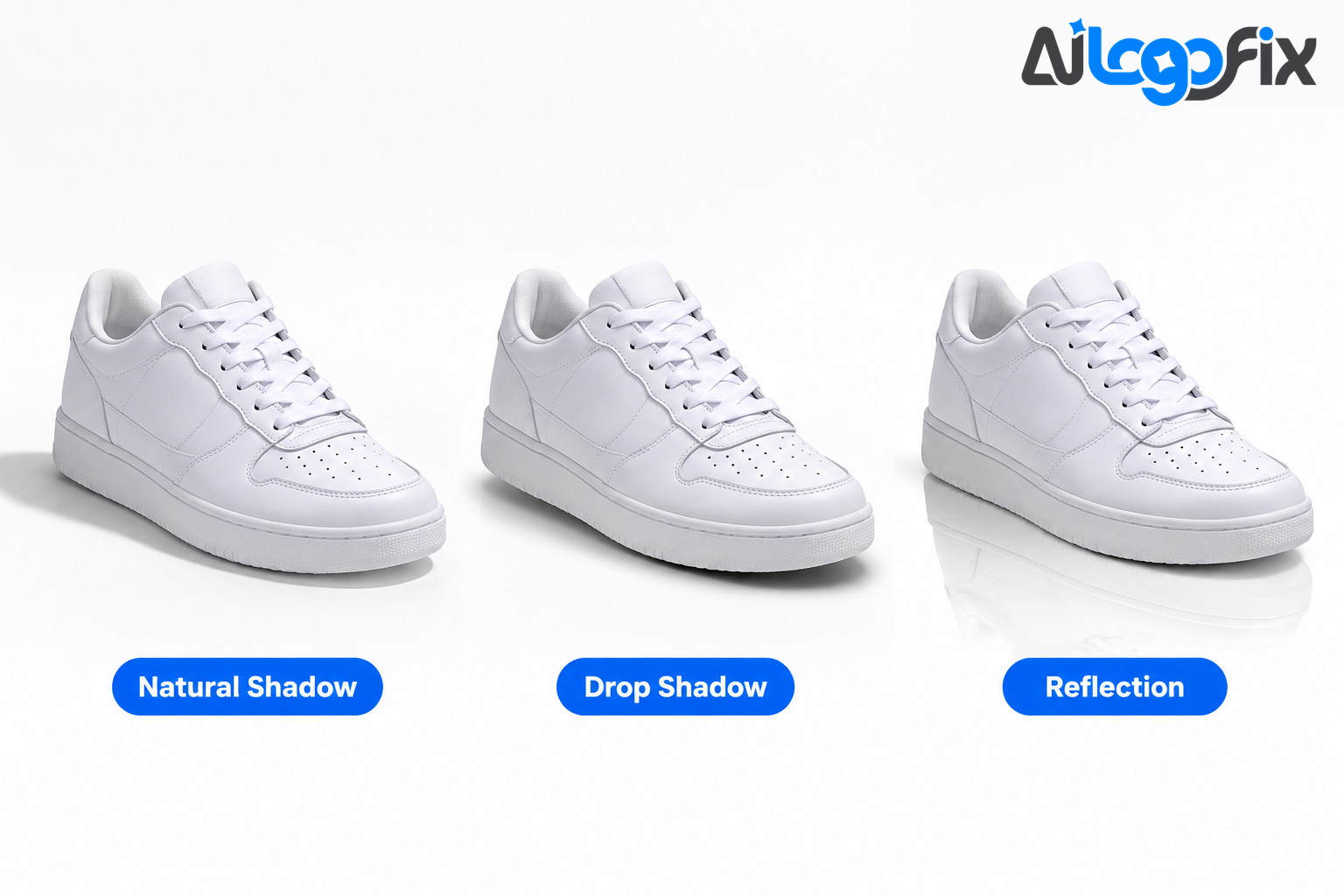
Look at a product photo and ask yourself one question: does this thing look like it exists in a real room, or does it look pasted onto the page? The difference is almost always the shadow. A product with no shadow floats. A product with the wrong shadow looks fake. A product with the right shadow looks like you could reach out and pick it up — and that feeling is what makes a shopper trust the listing enough to buy.
Shadows are not decoration. They tell the eye where the product sits, how heavy it is, and which way the light is coming from. Get them right and a plain white-background photo looks like a studio shot. Get them wrong and even a great product looks cheap. This guide explains the three shadows every seller needs to know — natural, drop, and reflection — when to use each one, and how to add them properly.
Why shadows matter more than you think
A shadow turns a flat cutout into an object in physical space. Without one, the brain reads the product as a sticker floating on white; with one, the same photo gains depth, weight, and context. That is why marketplaces care: a photo that looks real earns the click, and one that looks pasted gets scrolled past.
Shadows also create consistency. When every product in a catalogue casts its shadow in the same direction, the whole store looks like one studio shoot — even if the photos came from five suppliers. Inconsistent shadows tell the shopper the catalogue was assembled from random images.
And shadows are a trust signal. A clean, grounded photo says the seller is professional; a floating cutout says the opposite. For a small store competing against big brands, that gap matters.
Natural shadow: the realistic one
A natural shadow — also called a cast shadow — is the shadow a product would cast in real life if light fell on it from one direction. Captured during the photoshoot and refined in editing, it follows the product's actual lighting, so it is the most realistic of the three types.
A real shadow is sharper and darker where the product touches the surface, and softer and lighter as it stretches away. It also follows the product's shape — a bottle casts a long, thin shadow; a shoe casts a short, wide one. That behaviour is what the eye expects.
Natural shadows work best where realism matters most: furniture and homeware, where the shadow communicates size, weight, and stability, and larger products, where customers expect to see how the item sits on a surface. Brands such as IKEA, Habitat, and Herman Miller use them for exactly this reason.
The catch is that a natural shadow is the hardest to fake: it must match the light direction, and if the background was removed, the shadow has to be rebuilt from scratch. Done well it is invisible — the viewer only notices the photo looks real. Done badly, it is the first thing anyone sees.
Drop shadow: the ecommerce workhorse
A drop shadow is the most widely used shadow style in ecommerce photography. It is created during editing, after the background has been removed, and it sits slightly below or behind the product — an offset, soft, dark blur that lifts the product off the background without pretending to be a real cast shadow.
Drop shadows are stylised rather than photorealistic: they do not copy a real light source, they simply add depth. That makes them fast, controllable, and consistent — the editor sets the offset, blur, and opacity, and the same settings can be applied to an entire catalogue in minutes.
Drop shadows work best for small and medium products on plain backgrounds — electronics accessories, packaged goods, stationery — where the photo should look clean rather than atmospheric. Brands such as Bose, Joseph Joseph, and Bellroy use them to add depth while keeping images tidy.
The rule is restraint: a soft shadow at low opacity grounds the product, while a hard, dark, far-offset shadow makes it hover like a cartoon. Keep the offset small and the opacity low, so the shadow reads as depth, not as a shape of its own.
Reflection shadow: the premium one
A reflection shadow creates the illusion that a product is resting on a glossy surface, by placing a soft mirrored copy of the product beneath it, fading as it goes down. It suggests polished glass, a display case, or a wet studio floor — without any of those things being in the photo.
Reflection shadows are the premium choice: a refined, high-end look for products already associated with shine — watches, jewellery, glass, cosmetics, perfume, polished electronics. Brands such as Bang & Olufsen, Nespresso, and Aesop use them to make products feel expensive.
The effect must stay subtle. A strong reflection competes with the product and quickly looks artificial. Keep the mirrored copy shorter than the product, faded at its lower edge, and never sharper than the product above it.
Which shadow for which product
- Everyday products on white backgrounds: drop shadow. Fast, clean, consistent across a catalogue.
- Furniture, homeware, and large items: natural shadow. Customers need to feel the weight and the surface.
- Watches, jewellery, cosmetics, glass, and premium electronics: reflection shadow. The glossy look matches the product.
- Hero images, banners, and social posts: floating shadow, used sparingly, when you want drama rather than realism.
- Anything going to Amazon, eBay, or Walmart: keep it subtle, so the pure-white background rule still holds.
One rule covers all three: the light direction must be consistent across the whole catalogue. If one product's shadow falls left and the next one's falls right, the store looks assembled from random photos. Pick a direction — light from the upper left is the most common — and use it everywhere.
How to add each shadow in Photoshop
Drop shadow in Photoshop
The fastest route is Layer Styles: select the product layer, open Layer Style, choose Drop Shadow, and set a small distance, a moderate spread, and a soft size. Keep the opacity low — a shadow that is barely there is usually right — and it stays editable, so you can change the settings any time without touching the product.
Natural shadow in Photoshop
Real light does not work like a layer style — shadows are sharper near the contact point and softer further away. For a realistic natural shadow, build it manually:
1. Duplicate the subject layer and fill the copy with black. 2. Use Edit, Transform, Distort to skew the black copy in the direction opposite your light source, so it stretches away from the product. 3. Apply a Gaussian Blur of about 12 to 20 pixels to soften the shadow. 4. Reduce the shadow layer opacity to around 30 to 45 percent. 5. Add a layer mask and run a black-to-white gradient across it, so the shadow fades as it moves away from the base of the product.
This produces a directional shadow that matches a specific light angle — the detail that matters most when several products must share consistent lighting.
Reflection shadow in Photoshop
Duplicate the subject layer, flip the copy vertically, and position it directly below the original, aligned at the base. Then fade it with a layer mask gradient and reduce its opacity until it reads as a reflection rather than a second product. Reflection shadows work best on solid, flat backgrounds — white or light grey — because they imply a polished surface without needing to render the surface itself.
No Photoshop? Use a free editor
The same ideas work in free tools. GIMP handles shadows competently with its drop-shadow filter and layer tools, and browser-based editors such as Photopea offer layer styles and blur filters that cover all three shadow types. The technique matters more than the software: offset, blur, fade, and keep it subtle.
Common shadow mistakes
- Shadows falling in different directions across products in the same catalogue.
- Shadows that are too dark or too hard, so the product looks like it is floating over a black hole.
- Reflections stronger than the product itself, so the mirror image steals attention.
- Pure black shadows. Real shadows are dark grey, never solid black — a black shadow looks painted on.
- A shadow on the main image that is so heavy it reads as a background fault on a marketplace listing.
- Forgetting the shadow entirely after background removal, leaving the product floating on white.
Shadows, backgrounds, and marketplaces
Shadows and background removal go together. A shadow is added after the background is cut away, so the quality of the cut decides the quality of the shadow — a rough edge with a white halo makes any shadow look wrong. Clean edges first, shadow second.
For marketplace sellers, the background rules still apply: Amazon and Walmart want a pure white main-image background, and a subtle shadow does not break that rule — but a heavy, dark shadow can read as a background defect. Keep shadows soft and short on main images, and save the dramatic styles for your own store, social posts, and secondary gallery images. For the full marketplace image rules, see our Marketplace Image Size Cheat Sheet and Amazon, eBay, Walmart & Etsy Image Requirements Compared.
FAQ
What is the difference between a drop shadow and a natural shadow?
A drop shadow is a stylised, offset blur added in editing to lift a product off its background. A natural shadow copies the real shadow the product would cast — sharper near the product, softer further away. Drop shadows are faster and more consistent; natural shadows are more realistic.
Can I add shadows to product photos without Photoshop?
Yes. GIMP is a free editor with drop-shadow and blur tools that cover all three shadow types, and browser-based editors such as Photopea offer layer styles similar to Photoshop. The technique — offset, blur, fade, low opacity — is the same in every tool.
Why does my product look like it is floating after background removal?
Because the background was removed and nothing was put back underneath it — with no contact with any surface, the eye reads the product as floating. Even a very soft drop shadow is enough to ground it.
Which shadow should I use for jewellery or glass?
A reflection shadow, kept subtle. Jewellery, watches, cosmetics, and glass are products people associate with glossy surfaces, so a soft mirrored reflection makes them feel premium. Keep the reflection short and faded — if it is stronger than the product, it looks fake.
Do marketplaces allow shadows on main images?
Yes, as long as the background stays pure white. A soft, subtle shadow is standard on marketplace listings. What gets listings flagged is a dark or heavy shadow that reads as a background fault, or a shadow that changes the background colour away from white.
Conclusion
Shadows are the difference between a product photo and a product cutout. Natural shadows are the most realistic; drop shadows are the fastest and most consistent default for ecommerce; reflection shadows add a premium feel for jewellery, cosmetics, and electronics. Pick one light direction, keep the effect subtle, and apply it consistently — and a plain white-background photo starts looking like it came from a studio.
Product photos that look real, not pasted on.
Your products deserve photos that look like they were shot in a studio — clean edges, a true pure-white background, and a natural shadow that grounds every item. AiLogoFix's specialist team cuts out product photos by hand and adds realistic shadows, so your listings look professional on Amazon, Etsy, eBay, and your own store. Every order includes refinements within your selected package and agreed brief, and full commercial rights.
Get Clean Product Photos with Real Shadows →
Not sure which shadow your products need? Message the team — send a sample photo and we will tell you exactly what it needs, for free.