
What Files Should You Receive With a Professional Logo?
You paid for a professional logo. What lands in your inbox? If the answer is “a JPG and a prayer,” something went wrong.
In This Guide
- The Complete Logo File Package
- 1. The Vector Master (AI / EPS) — Non-Negotiable
- 2. Print Files (CMYK PDF)
- 3. Web Files (SVG, PNG, JPG)
- 4. Logo Variations
- 5. Color and Font Information
- FAQs
- Professional Logo Files: Frequently Asked Questions
- 6 Professional Logo Files Mistakes to Avoid
- Deep-Dive: Building a Bulletproof File Package
- When to Hire a Pro for Your Logo Files
- Professional Logo Files Glossary
A real logo delivery is a complete file package — vector masters, print files, web files, and the right color versions. Here is exactly what files you should receive with a professional logo, and how to check that each one is correct.
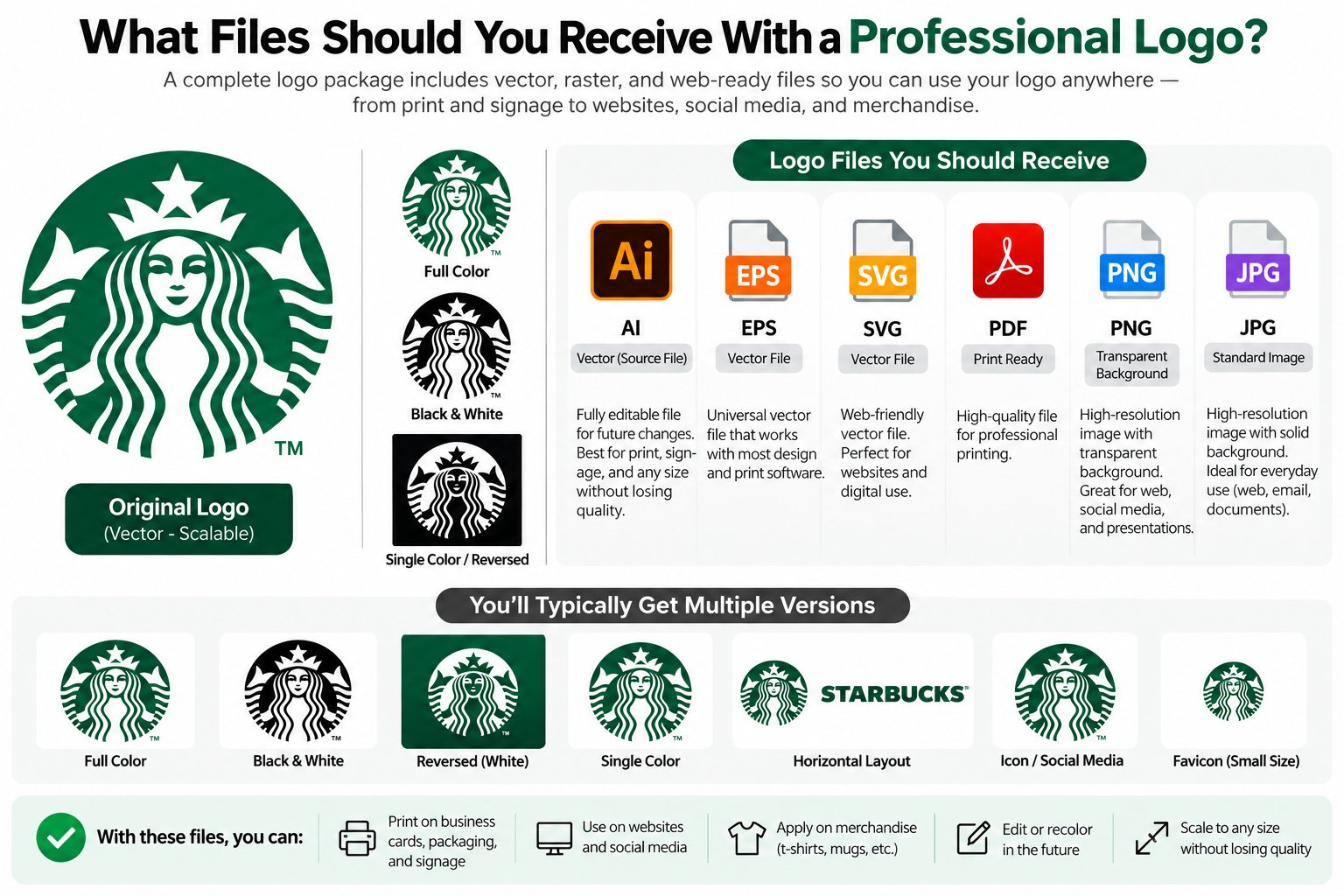
Quick answer: A professional logo package includes vector masters (AI, EPS, SVG, PDF), print files (CMYK, high resolution), web files (PNG, JPG, SVG), and logo variations (full color, black, white, icon-only). If you received only a JPG or PNG, you do not have a usable professional logo yet.
The Complete Logo File Package
| File type | Format | What it is for |
|---|---|---|
| Vector master | AI, EPS | The editable source — the most important file you own |
| Print-ready vector | PDF (CMYK) | Printers, business cards, packaging, signage |
| Web vector | SVG | Websites, apps — infinitely scalable, tiny file size |
| Transparent raster | PNG | Presentations, documents, social media, mockups |
| Flat raster | JPG | Email signatures, places that need a simple image |
Not sure what a vector file even is? Start with our guide: what is a vector file?
1. The Vector Master (AI / EPS) — Non-Negotiable
The vector master is the editable source of your logo — clean paths, correct text, proper layers. This is the file every future designer, printer, or sign maker will ask for. If you do not have this, you do not truly own your logo in any practical sense.
Ask for the native AI file (Adobe Illustrator) or EPS. Both are standard. If your designer says “I don’t provide source files,” that is a red flag — or an upsell you should pay, because without it you will pay far more later to rebuild the logo. Learn how that rebuild works: manual vector tracing vs auto trace.
2. Print Files (CMYK PDF)
Anything that goes to a physical printer needs CMYK color, not screen RGB. Your package should include a print-ready PDF in CMYK with fonts outlined (converted to curves), so the printer sees exactly your design with no font substitutions.
Common uses: business cards, letterheads, flyers, packaging, vehicle wraps, signage. A JPG emailed to a print shop is how blurry prints happen — read why logos look pixelated to see the same problem on screen.
3. Web Files (SVG, PNG, JPG)
For digital use you need three things:
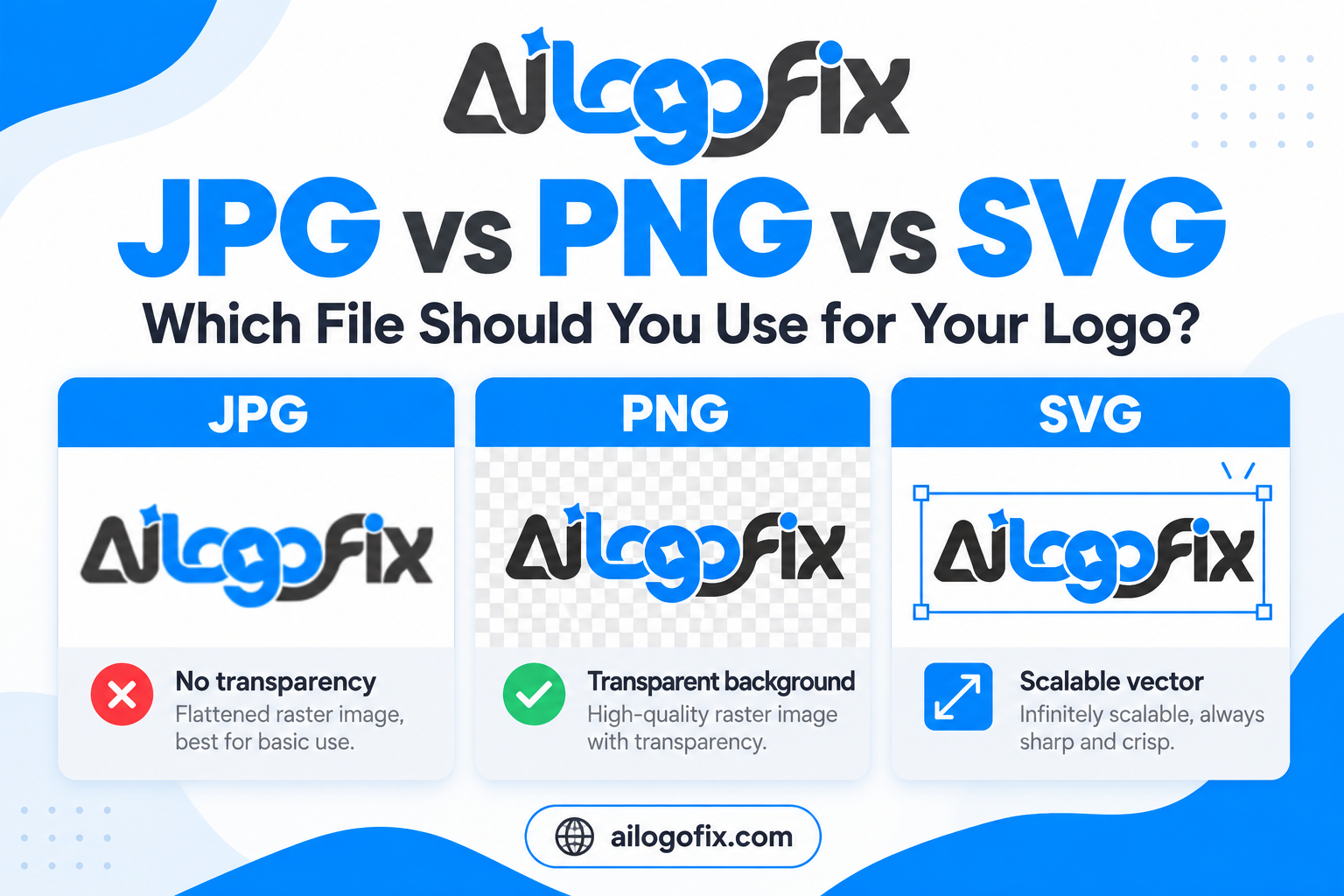
SVG — the web vector. Crisp at every screen size, tiny file, the right choice for your website header and logo.
PNG with transparency — for placing your logo over photos, colored backgrounds, and slides. Must have a truly transparent background — here is how transparency should be done (no jagged white edges).
JPG — a simple flat image for email signatures and platforms that do not accept PNG. Smallest use case, but handy to have.
Full comparison: JPG vs PNG vs SVG for logos.
4. Logo Variations
One logo file is not enough — real brands need versions for different contexts:
Full color — the primary logo, for light backgrounds.
Black (mono) — single-color version for fax, engraving, single-color print, stamps.
White (reversed) — for dark backgrounds, photos, and video overlays.
Icon / mark only — the symbol without the wordmark, for favicons, social avatars, and app icons.
Each variation should exist in both vector and web formats. A professional designer delivers these without being asked.
5. Color and Font Information
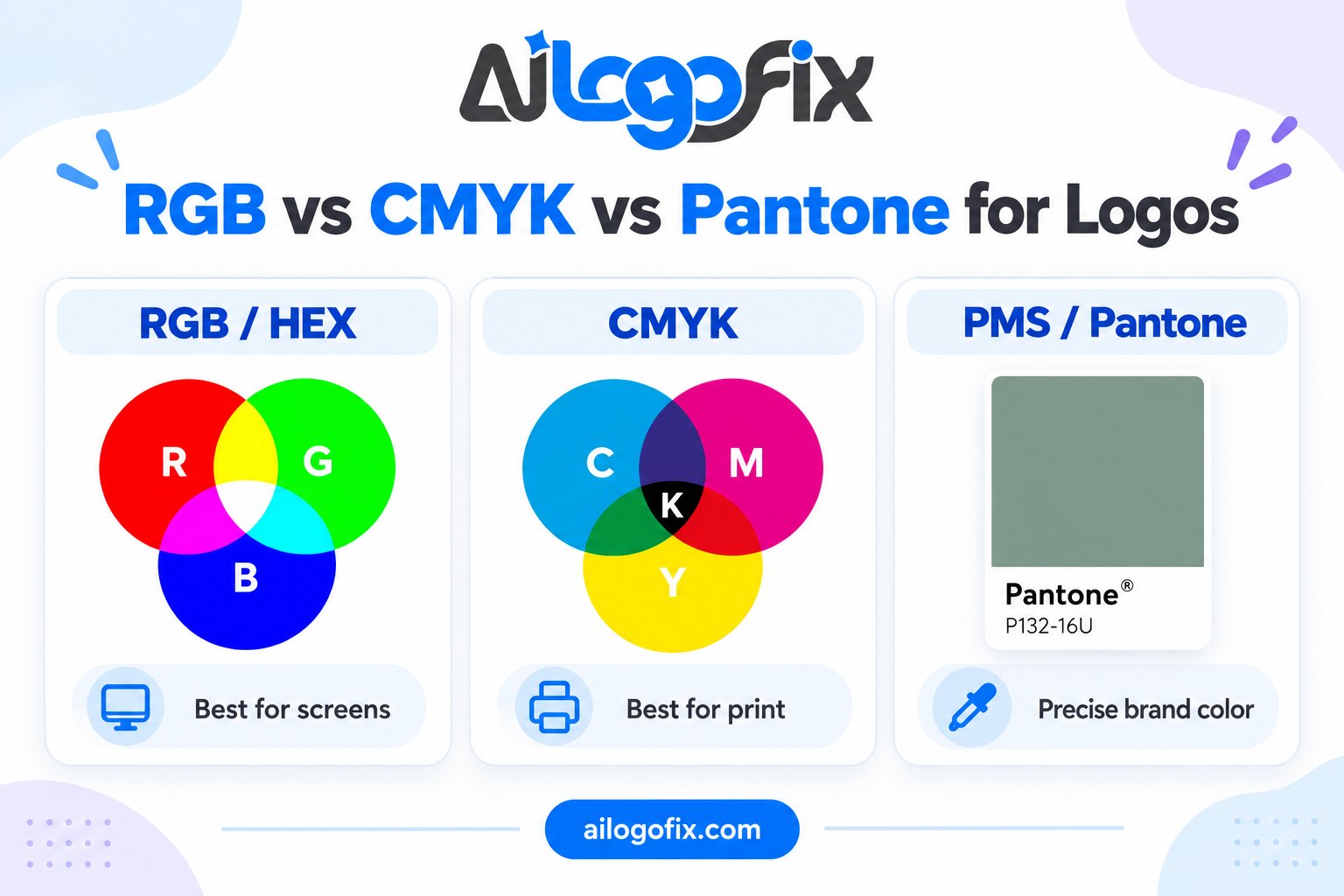
Your package should document the brand’s exact colors — RGB/HEX values for screen and CMYK (or Pantone) values for print — plus the font names used, or confirmation that text was outlined. This is what keeps your brand consistent when someone else makes your next flyer.
Only Got a JPG? We Will Rebuild the Full Package
If your “professional logo” arrived as a single low-resolution file, our designers will manually rebuild it as a true vector master and deliver the complete professional file package — vector, print, web, and every variation.
FAQs
What is the most important logo file to have?
The vector master (AI or EPS). Everything else can be exported from it; without it, every future use of your logo becomes a rebuild project.
Is a PNG enough for a professional logo?
No. A PNG is a flat pixel image — fine for a presentation slide, useless for print, signage, embroidery, or any resizing. You need the vector master behind it.
Should the designer give me the source files?
Yes — a professional delivery includes them. Some designers charge extra for source files; either way, get them. Working without source files costs far more over time.
What if I only received a JPG from my designer?
Go back and request the full package first — you paid for it. If the designer is unreachable or uncooperative, a vector service can rebuild your logo from the JPG into a complete professional package.
Do I need both RGB and CMYK versions?
Yes. RGB/HEX for screens, CMYK for print. Using an RGB file at a print shop is one of the most common causes of dull, wrong-colored prints.
How do I check my files are correct?
Open the AI/EPS and zoom to 800% — edges must stay perfectly smooth. Check the PDF is CMYK with outlined fonts. Open the PNG on a dark background — no white box or jagged edges allowed.
The bottom line: A professional logo is a package, not a picture. Vector masters, print files, web files, variations, and color specs — if any are missing, ask for them now, while the designer still remembers your project.
Professional Logo Files: Frequently Asked Questions
Every question about professional logo files, answered so you never accept an incomplete delivery again.
What are professional logo files exactly?
Professional logo files are the complete set of master artwork a designer delivers with a finished logo: editable vector sources, print-ready formats, and web-ready exports. A proper delivery includes AI, EPS, SVG, and PDF vectors plus transparent PNGs, organized in clearly labeled folders for print and digital use. If your designer handed you a single JPG, you did not receive professional logo files; you received a preview. The full package is what makes your logo usable everywhere for years.
Which vector formats count as professional logo files?
The core professional logo files in vector form are AI (Adobe Illustrator native, fully editable), EPS (print-industry standard), SVG (web standard, infinitely scalable), and PDF (universal, preserves vectors). Each serves a purpose: AI for future editing, EPS for print shops, SVG for websites, PDF for universal sharing. A delivery missing any of these has a gap you will feel later. True professional logo files always include all four.
Do professional logo files include PNG and JPG versions?
Yes, as convenience exports, not as masters. Professional logo files should include transparent-background PNGs at large sizes for documents, presentations, and social media, plus JPGs for uses that need small file sizes. But these raster exports are disposable: you can regenerate them from the vector masters anytime. Never accept raster-only delivery and call it done. The vectors are the real professional logo files; the PNGs are just handy copies.
What is the difference between CMYK and RGB logo files?
Professional logo files come in both color modes because print and screens reproduce color differently. CMYK versions are for anything printed: business cards, packaging, signage. RGB versions are for screens: websites, apps, social media. A designer who delivers only RGB files has left your print work to color-shift unpredictably. When you receive professional logo files, check that both versions exist and are clearly labeled so nobody grabs the wrong one.
How should professional logo files be organized?
Well-delivered professional logo files arrive in labeled folders: 01_Vector_Masters, 02_Print_CMYK, 03_Web_RGB, 04_Social_Media. File names should be descriptive (brandname-logo-primary-CMYK.eps), not “final_v2_REAL.ai”. This organization is part of what makes them professional: anyone on your team can find the right file without asking the designer. If your professional logo files arrived as a jumble of cryptically named attachments, ask for a proper package.
What if my old designer only gave me a JPG?
You do not have professional logo files, and you need them rebuilt. A JPG cannot be scaled up for print, cannot be cleanly edited, and degrades every time it is resaved. The fix is vectorization: a designer redraws your logo as true vector masters and builds the complete package. This is one of the most common requests we handle, and the rebuilt professional logo files usually come back better than the original, with flaws corrected.
Do I own my professional logo files outright?
You should. Proper professional logo files delivery includes full ownership transfer or an unlimited commercial license. Some budget designers retain rights or charge extra for source files; clarify this before work begins, not after. Your contract should state that all professional logo files, including editable sources, become your property on final payment. Without this, you may be paying ransom for your own brand assets later.
How often should I update my professional logo files?
Review your professional logo files every two to three years or whenever your brand touches a new medium. New print processes, new social platforms, and new signage all create new file requirements. A quick audit catches missing variants before they become emergencies. If your business has grown significantly since the files were made, a refresh of the package (not necessarily the logo) keeps everything working smoothly. Well-maintained professional logo files are a living toolkit, not a one-time download.
6 Professional Logo Files Mistakes to Avoid
1. Accepting a single JPG as “the logo.” A JPG is not a deliverable; it is a preview. Real professional logo files are a package of vectors and exports. Fix: use a delivery checklist and refuse to sign off until every format is present.
2. No CMYK versions. RGB-only professional logo files guarantee color surprises at the printer. Fix: require CMYK builds for every master format and spot-check them in a print proof.
3. Cryptic file names. “Logo_FINAL_final2.ai” helps nobody. Professional logo files need systematic naming: brand, variant, color mode, format. Fix: request a naming convention and folder structure as part of delivery.
4. Missing logo variants. One logo file is rarely enough; you need primary, stacked, icon-only, and monochrome versions. Complete professional logo files cover every layout situation. Fix: specify required variants in the brief before design starts.
5. No usage guidelines. Files without rules get misused: stretched, recolored, placed on clashing backgrounds. The best professional logo files arrive with a mini style guide covering clear space, minimum sizes, and color specs. Fix: ask for a one-page usage sheet with the delivery. The SVG format’s scalability is only useful if people use the right file.
6. Storing masters in one place. A single laptop holds your entire brand hostage to theft, failure, or loss. Professional logo files deserve redundant storage: cloud backup plus a local copy. Fix: on delivery day, copy the package to two independent locations and confirm both open correctly.
7. No vector source for the icon variant. Many packages include vectors for the primary logo but only PNGs for the social icon or favicon. When you need that icon large, you are stuck. Complete professional logo files include vector masters for every variant, not just the hero lockup. Fix: verify each variant exists as an editable vector before accepting delivery.
Deep-Dive: Building a Bulletproof File Package
A truly complete professional logo files package anticipates every future need. Beyond the standard formats, include a monochrome (single-color) version for fax, engraving, embroidery, and single-ink printing. Include reversed (white) versions for dark backgrounds. These variants take a designer minutes to prepare during the project but save hours of emergency work later.
Resolution matters even for vectors’ raster exports. Your professional logo files PNG exports should be generous: 3000 pixels wide minimum for the primary logo, so they survive large-format digital use. Social media crops should be pre-sized for major platforms. These details separate a thoughtful delivery from a bare-minimum one.
Document everything in a readme file inside the package: what each folder contains, which file to give a printer, which to upload to a website, and who to contact with questions. The best professional logo files are self-explanatory; a non-designer should be able to pick the right file without help. PDF’s universal compatibility makes it the safest format to share with anyone, anywhere.
Version control matters too. When your professional logo files get updated, archive the old package with a date stamp instead of overwriting it. Old marketing materials, legal documents, and trademark filings may reference the previous version. A simple dated archive folder prevents confusion and protects you if you ever need to prove what your logo looked like at a given time.
When to Hire a Pro for Your Logo Files
Hire a professional when you need professional logo files built correctly from the start: a new brand identity, a logo redraw, or a vectorization of existing artwork. Proper file preparation is a technical discipline involving color management, format standards, and print production knowledge. Getting it right the first time is far cheaper than fixing bad files later.
Also hire out when your current files are a mess: JPG-only delivery, wrong color modes, missing variants. Rebuilding into true professional logo files is standard restoration work, and the result usually improves on the original with corrected geometry and spacing.
A good provider delivers organized folders, systematic file names, both color modes, all key formats, logo variants, and a usage sheet. That complete package is what you are paying for, not just a pretty mark. Ask candidates to show a sample delivery package before you hire; the organization of their professional logo files tells you everything about their professionalism.
Need your logo files done right? Our logo design service delivers complete professional file packages with every project. Already have a logo but only a JPG? Message our team about vectorization and file rebuilding.
Professional Logo Files Glossary
AI: Adobe Illustrator native format. Fully editable master; the heart of professional logo files.
EPS: Encapsulated PostScript. Print-industry vector standard accepted by virtually all print shops.
SVG: Scalable Vector Graphics. Web vector format; crisp at any size, tiny file sizes.
PDF: Portable Document Format. Universal container that preserves vector data for sharing.
PNG: Raster format with transparency. Essential export within professional logo files for digital use.
CMYK: Four-ink print color model. Required versions for anything physically printed.
RGB: Screen color model. Required versions for websites, apps, and social media.
Monochrome version: Single-color logo variant for engraving, embroidery, and one-ink printing.
Clear space: Minimum empty margin around a logo, defined in every proper usage guide accompanying professional logo files.
Master files: The editable vector sources from which all exports derive. Losing these means losing the logo.
Vectorize: The process of redrawing raster artwork as clean vector paths, the usual route to true professional logo files when only a JPG exists.
Spot color: A premixed ink (like Pantone) used instead of CMYK builds for exact brand color reproduction in premium professional logo files packages.
Bottom line: Complete professional logo files are the difference between a logo that works everywhere and one that fights you at every printer, developer handoff, and social upload. Demand the full package, organize it well, back it up twice, and your brand is set for years.